

AI-Powered Scenario Generation
UserTrace automatically creates comprehensive test scenarios from simple text descriptions or document uploads.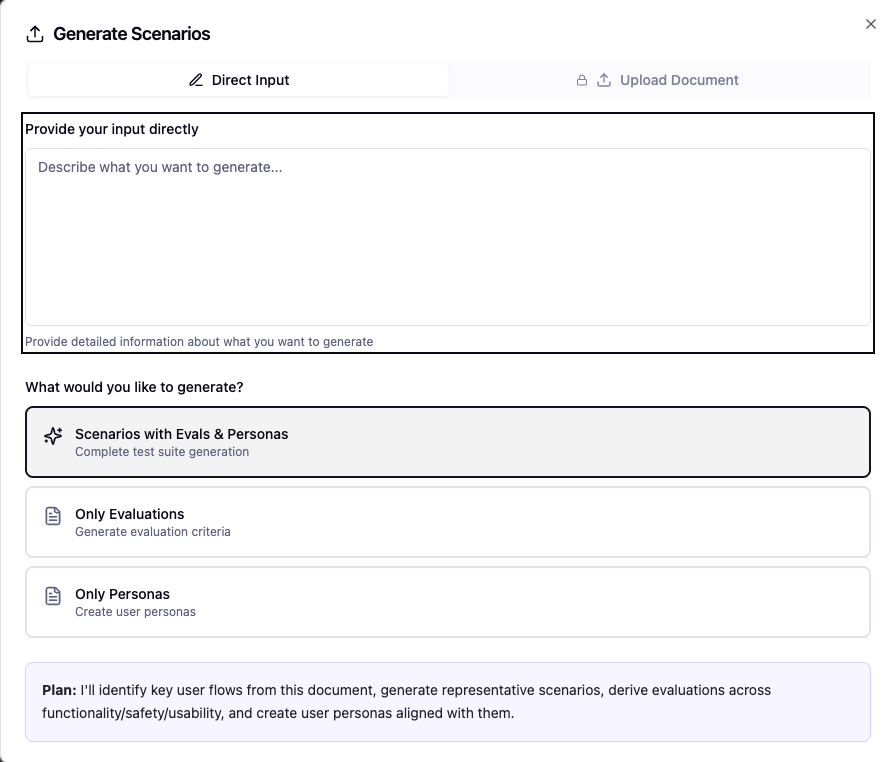
Input Methods
Text Description
Simple Natural Language InputDescribe your target user in plain text:“30-year-old professional dealing with work stress and seeking career guidance”UserTrace generates everything automatically.
Document Upload
Batch Scenario ImportUpload a document containing multiple scenarios you want to test your agent against.Perfect for existing test cases or comprehensive scenario libraries.
Advanced Settings
Fine-tune your scenario generation with advanced configuration options.Evaluation Strictness
Evaluation Strictness
Control Evaluation Criteria Precision• Lenient: Broader acceptance criteria, focuses on general success
• Moderate: Balanced evaluation with reasonable expectations
• Strict: Precise criteria with high standards for agent performance
• Moderate: Balanced evaluation with reasonable expectations
• Strict: Precise criteria with high standards for agent performance
Scenario Coverage
Scenario Coverage
Edge Cases and Failure Conditions• Basic: Core happy path scenarios
• Comprehensive: Includes common edge cases
• Extensive: Maximum coverage with rare failure conditions and stress tests
• Comprehensive: Includes common edge cases
• Extensive: Maximum coverage with rare failure conditions and stress tests
Generation Process
1. Preview & Review
After initial generation, UserTrace shows a preview of: • Scenarios - Realistic interaction flows• Evaluations - Success criteria and metrics
• Personas - Detailed user profiles with motivations and characteristics
2. Iterate with Feedback
Regenerate with Guidance
Not satisfied with the initial generation? Provide feedback and regenerate:• “Make scenarios more challenging”
• “Focus on angry customers”
• “Add technical troubleshooting cases”UserTrace refines the generation based on your input.
• “Add technical troubleshooting cases”UserTrace refines the generation based on your input.
3. Deep Research Mode
Once you approve the preview, UserTrace enters deep research mode:1
Agent Purpose Analysis
Analyzes your website and knowledge base to understand your agent’s role and capabilities.
2
Production Log Analysis
Reviews any production logs you’ve uploaded to understand real user patterns and pain points.
3
Historical Feedback Integration
Incorporates feedback from past simulations to improve scenario relevance and quality.
4
Knowledge Graph Creation
Builds a personalized knowledge graph tailored to your specific agent and use cases.
Processing Time: Deep research mode typically takes a few minutes to complete. You’ll receive a notification when your personalized knowledge graph is ready for simulation.
What You Get
The final output includes:Detailed Scenarios
Complete conversation flows with realistic user interactions, emotional states, and contextual background.
Comprehensive Evals
Multi-dimensional evaluation criteria covering functionality, safety, user satisfaction, and domain-specific metrics.
Rich Personas
Detailed user profiles with demographics, motivations, communication styles, and behavioral patterns.
Next Steps
With your scenarios generated, you’re ready to:- Review the detailed scenarios, evals, and personas
- Start simulations using your configured agents
- Analyze results and iterate on improvements
Ready to run your first simulation? Head to Running Simulations to launch realistic testing sessions.