> ## Documentation Index
> Fetch the complete documentation index at: https://docs.getusertrace.com/llms.txt
> Use this file to discover all available pages before exploring further.
# Creating Scenarios
> Generate realistic test scenarios with AI-powered scenario, evaluation, and persona creation
## AI-Powered Scenario Generation
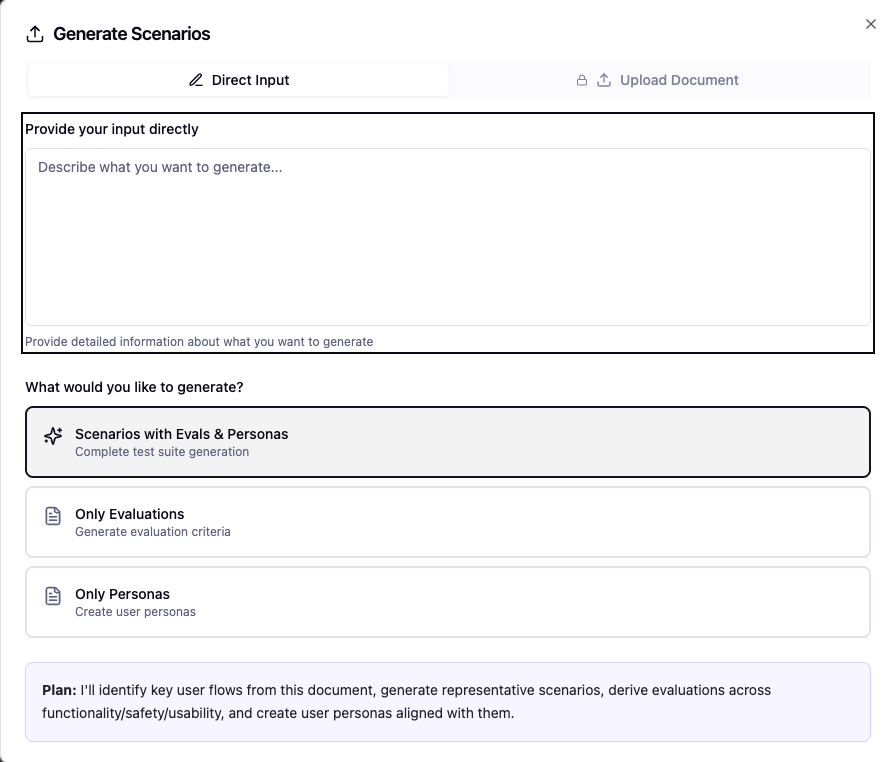
UserTrace automatically creates comprehensive test scenarios from simple text descriptions or document uploads.
 ## Input Methods
**Simple Natural Language Input**
Describe your target user in plain text:
*"30-year-old professional dealing with work stress and seeking career guidance"*
UserTrace generates everything automatically.
**Batch Scenario Import**
Upload a document containing multiple scenarios you want to test your agent against.
Perfect for existing test cases or comprehensive scenario libraries.
## Advanced Settings
Fine-tune your scenario generation with advanced configuration options.
**Control Evaluation Criteria Precision**
• **Lenient**: Broader acceptance criteria, focuses on general success\
• **Moderate**: Balanced evaluation with reasonable expectations\
• **Strict**: Precise criteria with high standards for agent performance
**Edge Cases and Failure Conditions**
• **Basic**: Core happy path scenarios\
• **Comprehensive**: Includes common edge cases\
• **Extensive**: Maximum coverage with rare failure conditions and stress tests
## Generation Process
### 1. Preview & Review
After initial generation, UserTrace shows a preview of:
• **Scenarios** - Realistic interaction flows\
• **Evaluations** - Success criteria and metrics\
• **Personas** - Detailed user profiles with motivations and characteristics
### 2. Iterate with Feedback
Not satisfied with the initial generation? Provide feedback and regenerate:
• "Make scenarios more challenging"
• "Focus on angry customers"\
• "Add technical troubleshooting cases"
UserTrace refines the generation based on your input.
### 3. Deep Research Mode
Once you approve the preview, UserTrace enters **deep research mode**:
Analyzes your website and knowledge base to understand your agent's role and capabilities.
Reviews any production logs you've uploaded to understand real user patterns and pain points.
Incorporates feedback from past simulations to improve scenario relevance and quality.
Builds a personalized knowledge graph tailored to your specific agent and use cases.
**Processing Time**: Deep research mode typically takes a few minutes to complete. You'll receive a notification when your personalized knowledge graph is ready for simulation.
## What You Get
The final output includes:
Complete conversation flows with realistic user interactions, emotional states, and contextual background.
Multi-dimensional evaluation criteria covering functionality, safety, user satisfaction, and domain-specific metrics.
Detailed user profiles with demographics, motivations, communication styles, and behavioral patterns.
## Next Steps
With your scenarios generated, you're ready to:
1. **Review** the detailed scenarios, evals, and personas
2. **Start simulations** using your configured agents
3. **Analyze results** and iterate on improvements
Ready to run your first simulation? Head to [Running Simulations](/running-simulations) to launch realistic testing sessions.
## Input Methods
**Simple Natural Language Input**
Describe your target user in plain text:
*"30-year-old professional dealing with work stress and seeking career guidance"*
UserTrace generates everything automatically.
**Batch Scenario Import**
Upload a document containing multiple scenarios you want to test your agent against.
Perfect for existing test cases or comprehensive scenario libraries.
## Advanced Settings
Fine-tune your scenario generation with advanced configuration options.
**Control Evaluation Criteria Precision**
• **Lenient**: Broader acceptance criteria, focuses on general success\
• **Moderate**: Balanced evaluation with reasonable expectations\
• **Strict**: Precise criteria with high standards for agent performance
**Edge Cases and Failure Conditions**
• **Basic**: Core happy path scenarios\
• **Comprehensive**: Includes common edge cases\
• **Extensive**: Maximum coverage with rare failure conditions and stress tests
## Generation Process
### 1. Preview & Review
After initial generation, UserTrace shows a preview of:
• **Scenarios** - Realistic interaction flows\
• **Evaluations** - Success criteria and metrics\
• **Personas** - Detailed user profiles with motivations and characteristics
### 2. Iterate with Feedback
Not satisfied with the initial generation? Provide feedback and regenerate:
• "Make scenarios more challenging"
• "Focus on angry customers"\
• "Add technical troubleshooting cases"
UserTrace refines the generation based on your input.
### 3. Deep Research Mode
Once you approve the preview, UserTrace enters **deep research mode**:
Analyzes your website and knowledge base to understand your agent's role and capabilities.
Reviews any production logs you've uploaded to understand real user patterns and pain points.
Incorporates feedback from past simulations to improve scenario relevance and quality.
Builds a personalized knowledge graph tailored to your specific agent and use cases.
**Processing Time**: Deep research mode typically takes a few minutes to complete. You'll receive a notification when your personalized knowledge graph is ready for simulation.
## What You Get
The final output includes:
Complete conversation flows with realistic user interactions, emotional states, and contextual background.
Multi-dimensional evaluation criteria covering functionality, safety, user satisfaction, and domain-specific metrics.
Detailed user profiles with demographics, motivations, communication styles, and behavioral patterns.
## Next Steps
With your scenarios generated, you're ready to:
1. **Review** the detailed scenarios, evals, and personas
2. **Start simulations** using your configured agents
3. **Analyze results** and iterate on improvements
Ready to run your first simulation? Head to [Running Simulations](/running-simulations) to launch realistic testing sessions.